MCP is how AI talks to software.
Now it speaks Odoo.
The Model Context Protocol is the open standard AI assistants use to call external tools. The USB-C of AI integrations. 360 Odoo MCP puts a governed MCP endpoint in front of your Odoo, so assistants stop guessing about your business and start reading it. This is MCP with guardrails: how 360 exposes safe Claude and ChatGPT access to your ERP.
Three steps. No new infrastructure.
Your Odoo already talks to the 360 AI server. The MCP relay rides that same connection: nothing new to host or expose.
Connect your environment
Your Odoo is registered as an environment on the 360 AI server. One probe validates the link and syncs models, users and languages over the standard x360 connection.
Scope what AI can reach
Activate the models the assistant may see. Optionally pin the exact public methods per model. Everything else answers Unknown remote model.
Connect your client
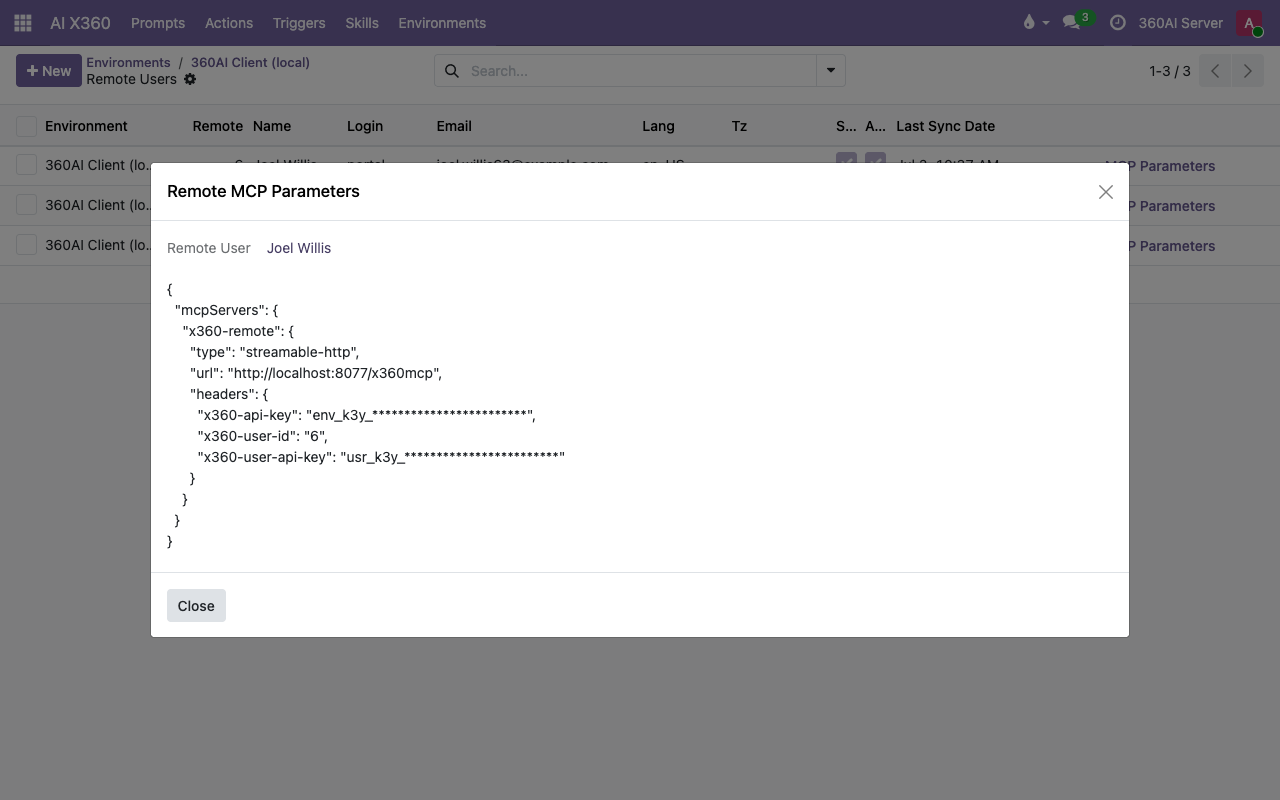
On the web and on mobile, users add the connector and sign in with their own Odoo login (OAuth). Desktop and scripted clients paste a personal JSON snippet from the MCP Parameters wizard. First answer in minutes.
/x360mcp
- Two-key authentication, constant-time
- Model & method allowlists
- Relays as the authenticated user
Seven tools. The whole surface an assistant needs.
A typed MCP toolset over Odoo's own RPC. Full domains, field metadata, grouped aggregates: everything an assistant needs to answer properly.
Find and read records with full Odoo domains, field selection, ordering and pagination.
Fetch specific records by ID. Just the fields you ask for.
Count anything instantly, without pulling a single record into the conversation.
Field definitions and metadata, so the assistant understands your schema before it queries.
Discover which models are open to the assistant. The allowlist, nothing more.
Grouped aggregates straight from the ORM: revenue by month, tickets by team, pipeline by stage.
Call public model methods. Only the ones you allowlisted, model by model.
Every tool accepts an Odoo language and context. Answers arrive in your users' language, timezone and company.
Give AI answers,
not the keys to your ERP.
Access is layered: protocol, environment, user, model, method. Every layer must agree before a single record leaves your Odoo.
Runs as a real user
Every tool call is bound to the authenticated remote user. Odoo's own ACLs and record rules decide what comes back. No shared super-user, ever.
Sign in, don't paste keys
OAuth 2.0 with the user's own Odoo login: authorization code with PKCE, dynamic client registration, refresh tokens. Revoke a client from Odoo at any time.
Two keys, both expiring
Config-based connections send an environment key plus a personal user key, validated together in constant time. Both carry expiry dates you control.
Model allowlist
Only synced, active models are reachable. Anything else returns Unknown remote model. The assistant can't even see that it exists.
Method allowlist
Method calls are opt-in per model, method by method. Private (underscore) methods are blocked outright.
Read-first by design
No generic create, write or delete tools are exposed. If the AI changes anything, it's through a method you deliberately allowed.
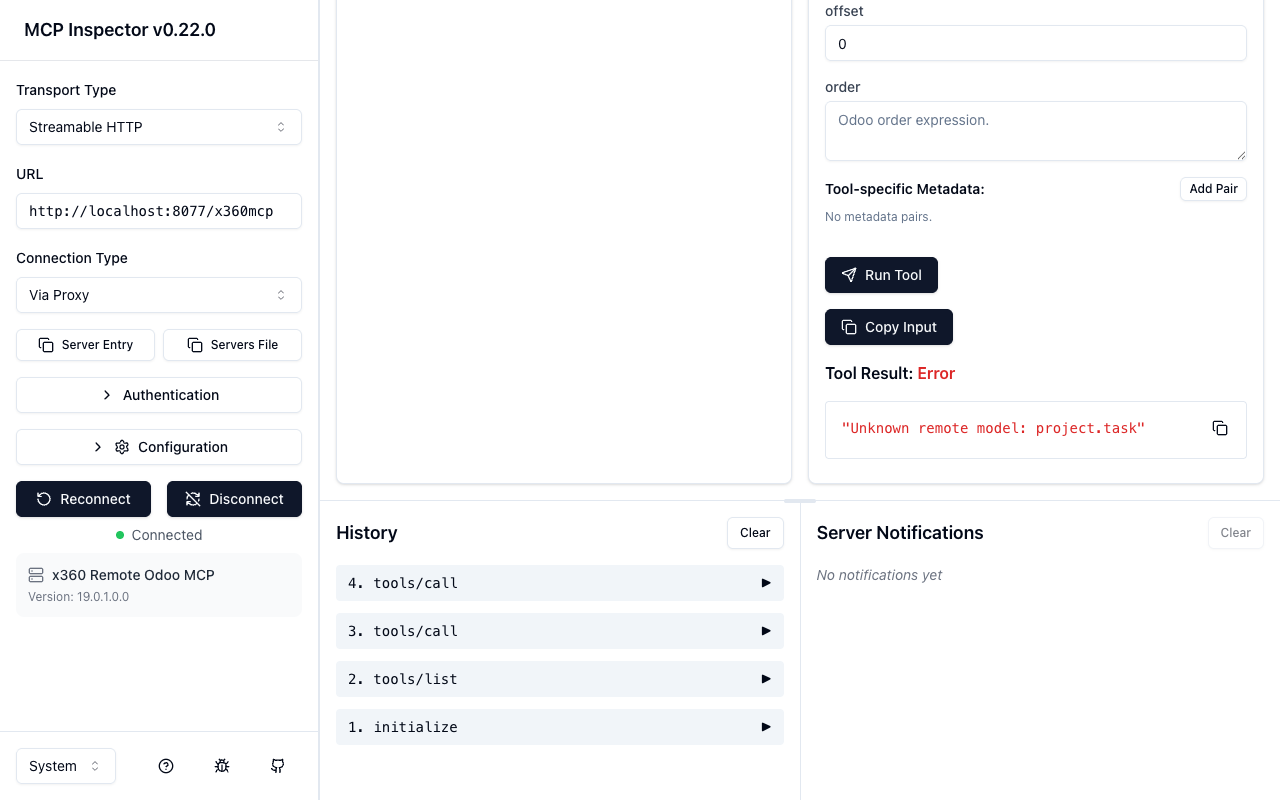
project.task isn't on it, so the relay refuses before your Odoo is even asked.Not a concept. Running today.
360 Odoo MCP ships as modules on the 360 AI server and connects environments on Odoo 16 through 19, 20-ready. Below: a live tool call through the relay, a connected environment with 432 synced models, and the per-user wizard that generates a paste-ready config.
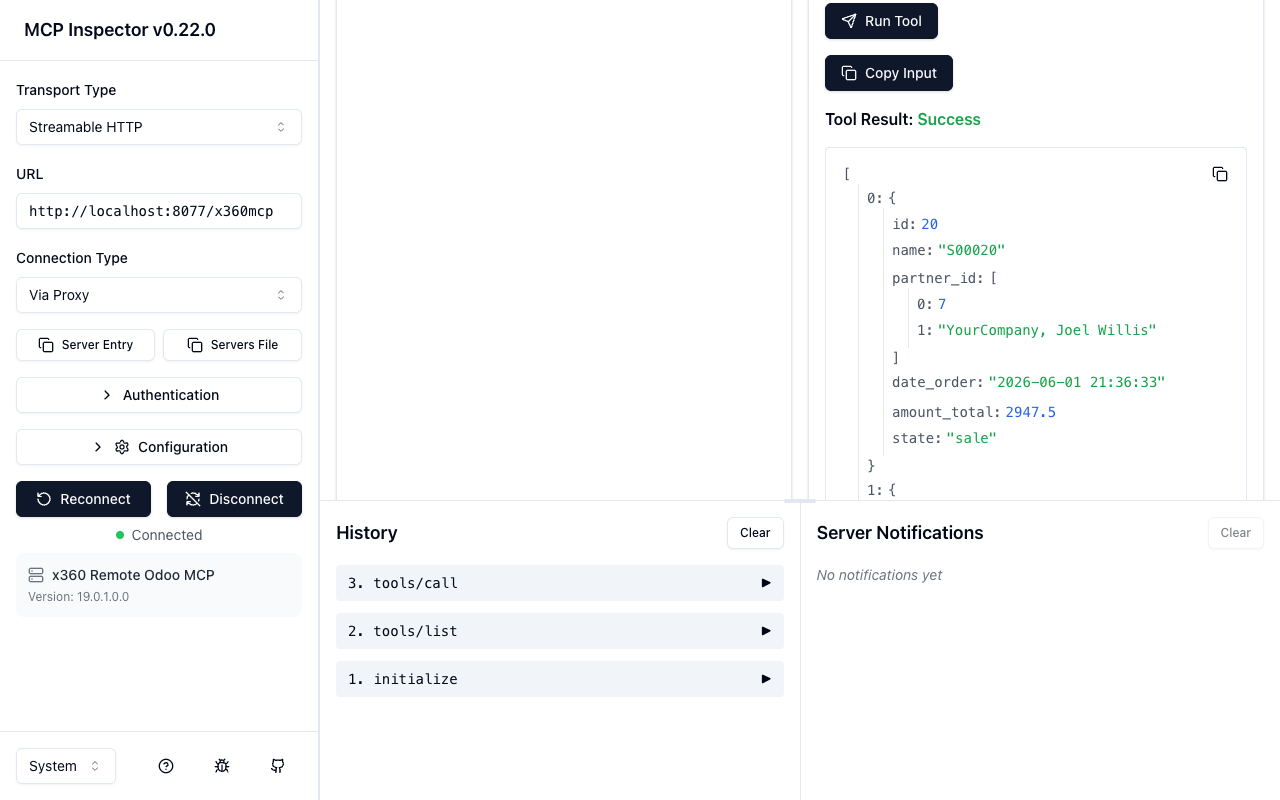
x360_search_read on sale.order through the live relay: real records back in the client. Joel is a portal user, so he gets his own orders and nothing else.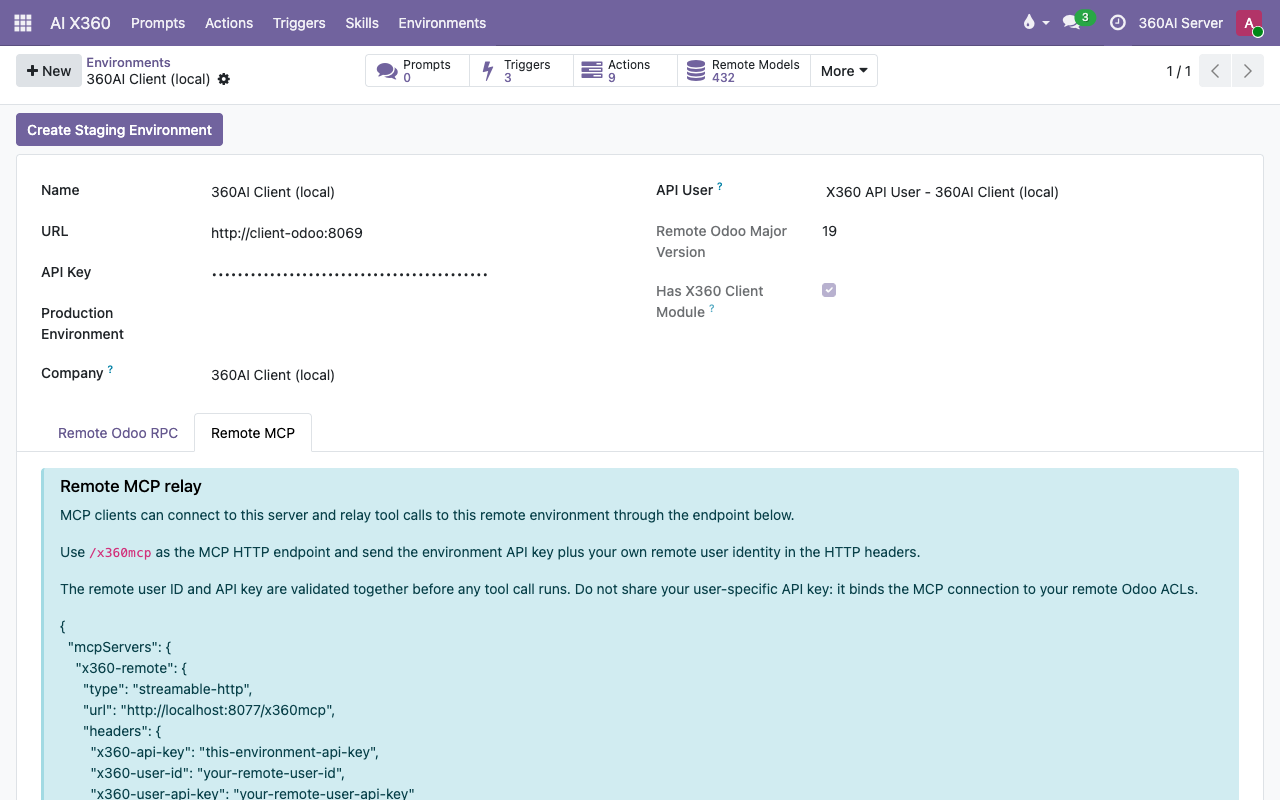
Ask. Report. Decide.
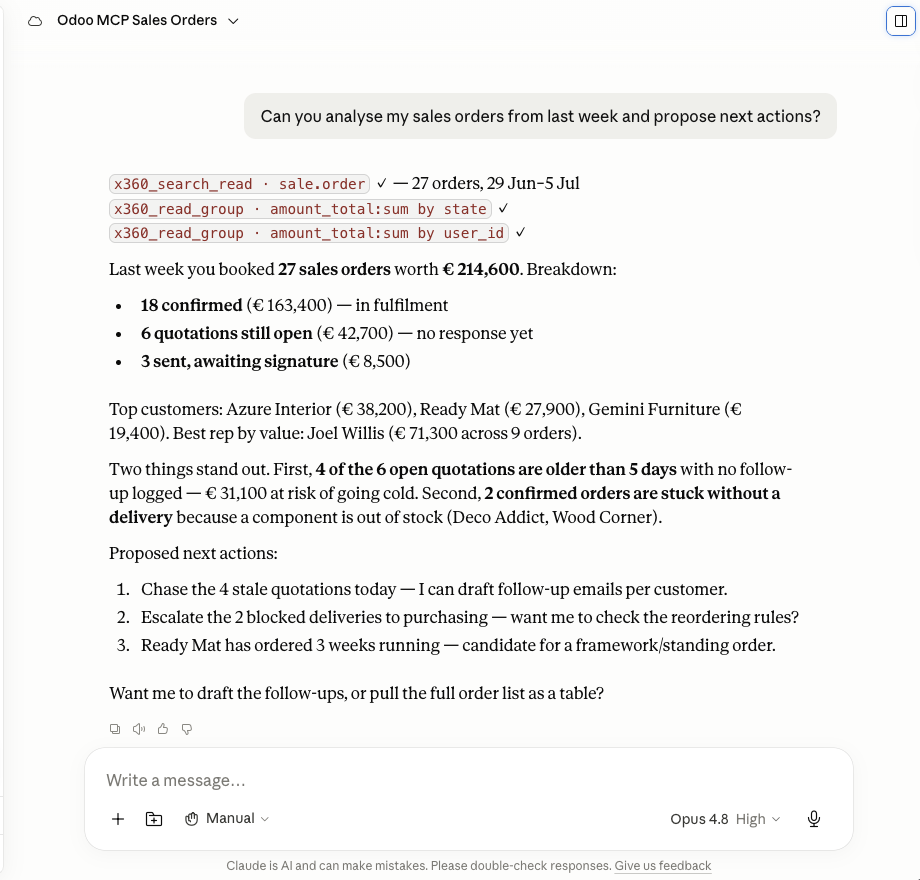
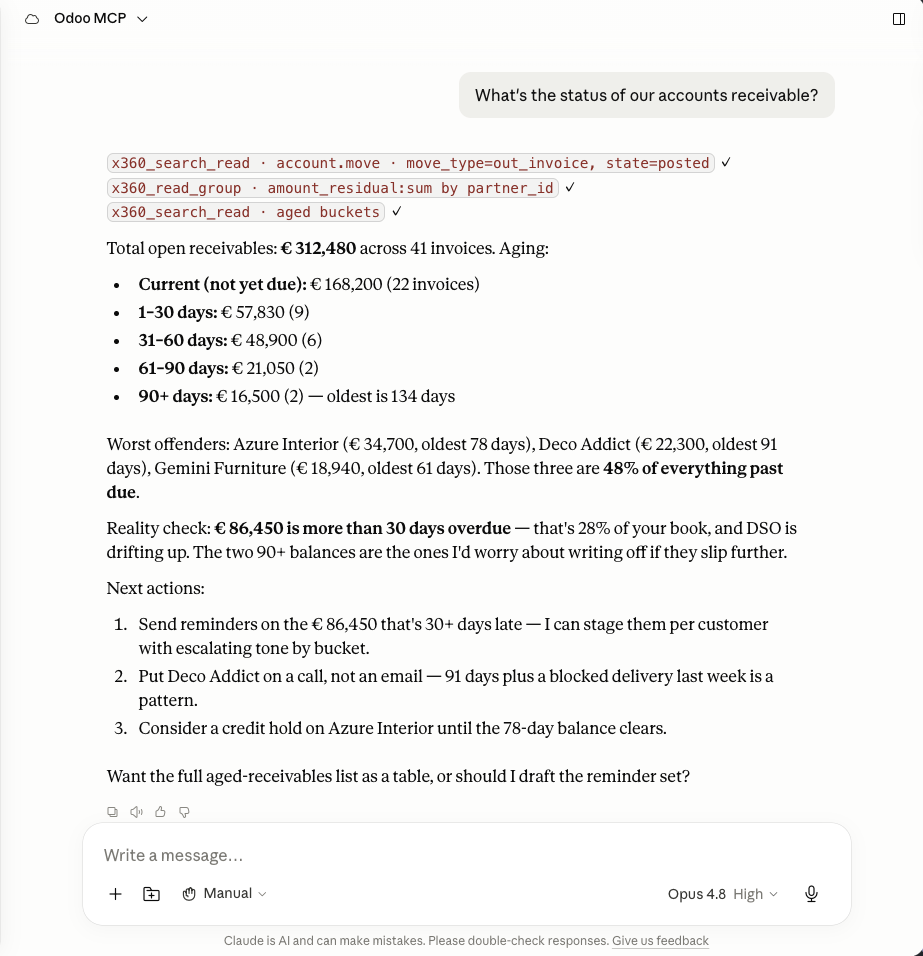
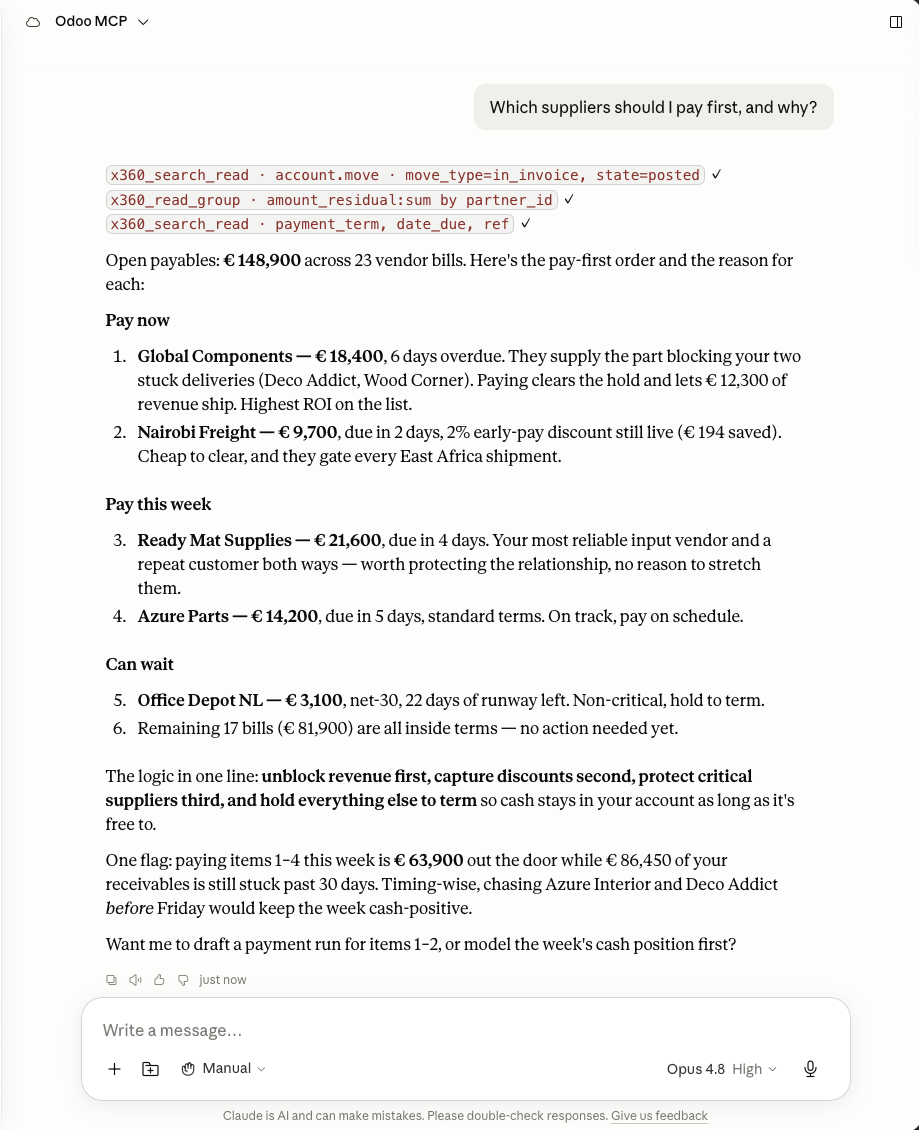
Real conversations in Claude over the MCP connection. Every answer starts with the x360 tool calls you can see at the top of the reply. Click any screenshot to read along. Want the AI to finish the work instead of reporting it? That's the agents, on the Solutions page.
One sign-in. Or three lines of JSON.
- On the 360 AI platform? Your server already has the endpoint. Open an environment, sync users, hand out configs.
- Pick who gets access. Each user gets a personal key with an expiry date you control. Revoke one user without touching the rest.
- Sign in or paste. On claude.ai, ChatGPT or the mobile apps: add the connector and sign in with your Odoo login. On Claude Desktop, Claude Code or Cursor: paste the snippet.
{
  "mcpServers": {
    "x360-remote": {
      "type": "streamable-http",
      "url": "https://<your-360-ai-server>/x360mcp",
      "headers": {
        "x360-api-key": "<environment-api-key>",
        "x360-user-id": "<your-user-id>",
        "x360-user-api-key": "<your-personal-key>"
      }
    }
  }
}The questions your IT team will ask.
Which AI clients can connect?
How does the OAuth sign-in work?
Can the assistant change my data?
x360_call_method. Private (underscore) methods are blocked outright.What data can the assistant see?
Does my Odoo have to be exposed to the internet?
/x360mcp endpoint. Your Odoo talks to that server over the existing x360 connection. No extra ports, no new public surface.What's under the hood?
Your ERP already knows the answer.
Let it speak.
360 Odoo MCP is part of the 360 AI platform by 360 ERP. Put a governed MCP endpoint in front of your Odoo and give every assistant in your company the same, safe view of the business.
Talk to 360 ERP